Programmable Building Kits for Robotics-Minded Kids: A Parent’s Comparison

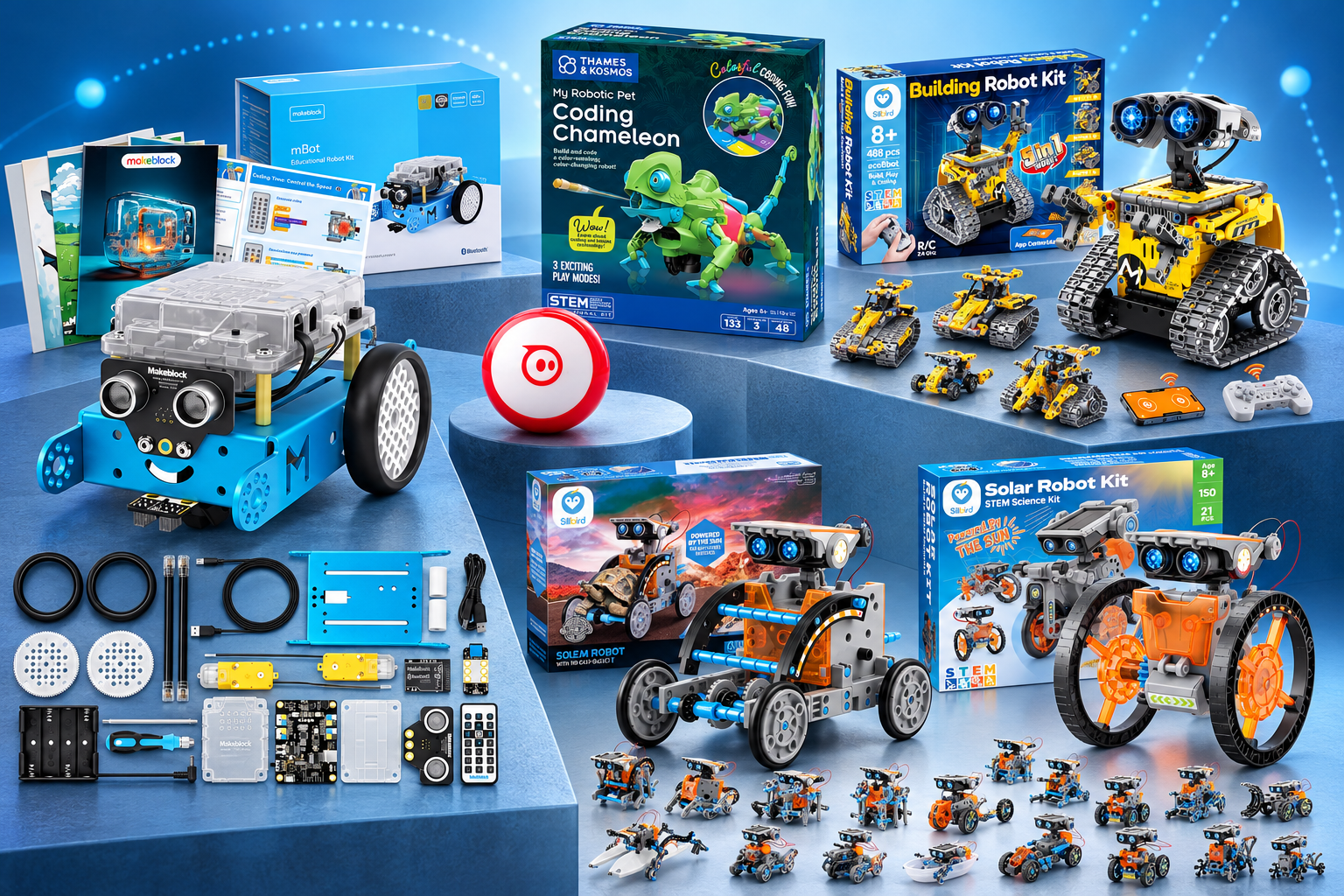
If your child lights up at the idea of building a robot and then telling it what to do, programmable building kits for kids can turn that curiosity into real skills. The six kits in this comparison range from app-driven coding robots to screen-free color-sensing pets and solar-powered builders. Each one teaches something different, so the right pick depends on your child’s age, patience for assembly, and whether you want coding on a screen or hands-on play.
We compared these kits using the supplied product details: recommended age ranges, piece counts, control methods, power sources, and included components. That gives you a practical starting point for matching a kit to your child’s experience level and your family’s preferences.
Quick Picks
- Best for learning block-to-text coding: Makeblock mBot Arduino Robot Kit
- Best for quick, portable play: Sphero Mini (Red)
- Best screen-free coding option: Thames & Kosmos My Robotic Pet: Coding Chameleon
- Best for app and remote control variety: Sillbird 5-in-1 Programmable Robot Set
- Best for solar-powered engineering: Sillbird 12-in-1 Solar Robot Building Kit
- Best for the widest build variety: Sillbird 15-in-1 Solar Building Robot Kit
Best for Learning Block-to-Text Coding — Makeblock mBot Arduino Robot Kit with Scratch Coding Box for Kids Ages 8-12 | Learn to Code with Scratch & Arduino, 4 Programming Learning Projects, Mblock STEM Educational Robotics Gift for Boys & Girls
This kit may suit a child who wants to grow from drag-and-drop coding into Arduino programming. The supplied details describe a structured path from block-based coding to text-based code, which makes it a strong fit for a beginner who is ready to build real programming skills over time.

The mBot pairs a buildable robot with a Coding Box and four learning projects, including line-following, obstacle avoidance, and remote control. Each project comes with visual instructions and coding tips, so your child can troubleshoot without you needing to be a programmer. Assembly is described as taking about 15 minutes, which keeps the focus on coding rather than a long build. The kit includes the mCore mainboard, two motors, a line-follower sensor, wheels, cables, a screwdriver, a USB cable, an infrared remote, and access to the free mBlock platform with eight step-by-step online courses.
Key Features
- Buildable Arduino-based robot with a Scratch Coding Box
- Four programming projects with visual instructions and coding tips
- Progresses from block-based coding to Arduino
- Includes mCore mainboard, two motors, line-follower sensor, and remote control
- Free mBlock platform access with eight online courses
Pros
- Clear learning progression from Scratch blocks to Arduino code
- Multiple projects give kids several ways to apply new skills
- Fast assembly keeps the focus on programming
- Comes with a remote for non-coding play
Things to Consider
- Best suited to ages 8–12 per the supplied age range
- Requires a device to use the mBlock platform and coding projects
Best for: Kids who want a guided path from block coding to real Arduino programming.
Best for Quick, Portable Play — Sphero Mini (Red) – Coding Robot Ball – Educational Coding and Gaming for Kids and Teens – Bluetooth Connectivity – Interactive and Fun Learning Experience for Ages 8+
Sphero Mini may be a good fit if you want a coding robot your child can use almost anywhere. It is a ping-pong-ball-sized robot with a gyroscope, accelerometer, and colorful LED lights, and the supplied details position it as an entry point into robotics for beginners.

The free Sphero Edu app lets kids draw on the screen, use drag-and-drop coding blocks, or write JavaScript, so the same robot can serve a young beginner and an older child ready for text code. The Sphero Play app adds drive modes and arcade-style games, and the kit includes three mini traffic cones and six mini bowling pins for obstacle courses right out of the box. Bluetooth connectivity keeps setup simple, and the supplied details list about one hour of play time per charge.
Key Features
- Programmable robot ball with gyroscope, accelerometer, and LED lights
- Sphero Edu app supports drawing, block coding, and JavaScript
- Sphero Play app offers drive modes and three arcade-style games
- Includes three traffic cones, six bowling pins, and a micro USB charging cable
- Bluetooth connectivity with about one hour of play time
Pros
- Compact size works well in small spaces and on the go
- Three coding approaches suit different skill levels
- Games and obstacle pieces add play value beyond coding
- Simple app-based setup
Things to Consider
- Requires a mobile device and the free apps to code and play
- Play time is limited to about one hour per charge
Best for: Families who want a portable, app-based coding robot with built-in games.
Best Screen-Free Coding Option — Thames & Kosmos My Robotic Pet: Coding Chameleon STEM Building & Experiment Kit | Color-Sensing Coding Robot for Boys & Girls Ages 8+, Screen-Free Educational Fun, Robotic Reptile with 3 Play Modes
This kit stands out if you want coding lessons without screens. Kids build a 15-inch robotic chameleon and program it using physical colored action cards, so the logic of sequencing and cause-and-effect stays hands-on.

The chameleon uses a color sensor, infrared sensor, and RGB LEDs to react to the cards and its surroundings. Three play modes cover different kinds of fun: Coding Mode runs programmed movement sequences, Wild Mode changes color to match surroundings, and Pet Mode responds to touch. The 133-piece model includes articulated eyes, torso, and leg joints for realistic movement, and the 48-page manual guides assembly and explains how nature inspires engineering design. The supplied details note that ages 8 and up can build with adult help, while ages 12 and up can work independently.
Key Features
- Buildable 15-inch robotic chameleon with 133 pieces
- Screen-free coding with physical colored action cards
- Color sensor, infrared sensor, and RGB LEDs
- Three play modes: Coding, Wild, and Pet
- 48-page manual with assembly guidance and engineering lessons
Pros
- No screens, devices, or software required
- Color-changing and touch-responsive play add variety
- Manual connects robotics to real-world engineering ideas
- Articulated joints support realistic movement
Things to Consider
- Requires four AAA batteries, which the supplied details list as required
- Younger children may need adult help during assembly
Best for: Families who prefer screen-free, hands-on coding lessons with a playful animal theme.
Best for App and Remote Control Variety — Sillbird STEM Robot Building Kit with Remote Control Gifts for Boys 8-13 | Coding Robotic Set, Educational Birthday Gifts, App-Controlled, Buildable 5in1 Models, Rechargeable Toys for Kids, 488 Pieces
Consider this Sillbird set if your child enjoys building first and controlling the result second. The 488-piece kit builds five different models with increasing difficulty, and kids can drive them with either the app or the included remote.

The dual control modes cover basic programming, path following, and precise movement, which gives kids several ways to interact with what they build. Models include a robot, dinosaur, car, and tank, and adjustable head, arms, and tail parts allow playful poses. Clear, colorful step-by-step instructions support independent building or family build sessions. The rechargeable design offers up to 40 minutes of play per charge, so you avoid a steady stream of battery swaps.
Key Features
- 488-piece kit with five buildable models
- App control via Bluetooth plus a physical remote
- Basic programming, path, and precise movement features
- Adjustable head, arms, and tail for posing
- Rechargeable with up to 40 minutes of play per charge
Pros
- Five models give kids repeated build-and-play cycles
- Two control methods suit different play styles
- Progressive difficulty supports skill growth
- Rechargeable design reduces battery costs
Things to Consider
- Play time runs about 40 minutes per charge
- App features require a Bluetooth-capable device
Best for: Kids ages 8–12 who want to build multiple robot models and control them by app or remote.
Best for Solar-Powered Engineering — Sillbird 12-in-1 Solar Robot Building Kit STEM Gift for Boys Ages 8-13 | Powered by the Sun, Engineering Skills, DIY Educational Kit, Birthday Presents for Kids, Buildable Learning Set, 190 Pieces
This kit may suit a child who is curious about renewable energy. It runs on sunlight outdoors or a strong artificial light indoors, so kids can see how solar power translates into motion while they build.

With 190 parts, kids can build 12 models such as robots and cars, and the difficulty levels increase as skills grow. The upgraded larger solar panel is described as catching more sunlight for stronger power output. Clear step-by-step instructions support independent building or family sessions, and the supplied details frame the kit as screen-free fun that introduces engineering and renewable energy concepts.
Key Features
- 190-piece kit with 12 buildable models
- Solar-powered with an upgraded larger solar panel
- Works outdoors in sunlight or indoors with a strong light source
- Increasing difficulty levels across builds
- Step-by-step instructions included
Pros
- Teaches renewable energy through hands-on building
- Twelve models provide long-term building variety
- No batteries required per the supplied details
- Difficulty levels grow with your child
Things to Consider
- Manufacturer recommended age is 10 years and up
- Needs direct sunlight or a strong artificial light source to run
Best for: Older kids who want to explore solar power and engineering through repeated builds.
Best for the Widest Build Variety — Sillbird Solar Building Robot Kit 15-in-1 STEM Gift for Boys Aged 8-13 | Sun or Battery Powered Robotic, DIY Educational Set, Science Learning Project, Birthday Presents for Kids, 212 Pieces
If your child wants the most building options in this comparison, this 15-in-1 kit offers the largest model count. It runs on sunlight outdoors or batteries indoors, so play does not stop when the weather changes.

The 212-piece set builds 15 forms, including a robot, car, and motorcycle, with beginner-friendly builds leading into advanced challenges. An illustrated manual shows each step in detail, which helps kids build alone or alongside a parent. The dual power option adds flexibility: solar power outdoors, battery power indoors. The supplied details describe it as a science learning project suited to classrooms, homeschoolers, and future engineers.
Key Features
- 212-piece kit with 15 buildable forms
- Solar power outdoors or battery power indoors
- Illustrated step-by-step manual
- Beginner to advanced difficulty progression
- Supports solo or parent-and-child building
Pros
- Most build options among the kits compared here
- Dual power keeps play going in any weather
- Detailed manual supports independent building
- Works for classroom or homeschool use
Things to Consider
- Battery mode requires batteries, which the supplied details do not specify
- Large model count may mean longer assembly sessions
Best for: Kids who want the widest variety of solar-powered builds and flexible indoor or outdoor play.
Product Comparison
| Product | Best for | Key feature | Age range | Important limitation |
|---|---|---|---|---|
| Makeblock mBot Arduino Robot Kit | Block-to-text coding progression | Scratch to Arduino learning path with four projects | 8–12 years | Requires a device for coding projects |
| Sphero Mini (Red) | Portable app-based play | Three coding approaches plus arcade games | 8+ years | About one hour of play per charge |
| Thames & Kosmos Coding Chameleon | Screen-free coding | Physical action cards and three play modes | 8+ with help; 12+ independent | Requires four AAA batteries |
| Sillbird 5-in-1 Programmable Robot Set | App and remote control variety | Five models with dual control modes | 8–12 years | About 40 minutes of play per charge |
| Sillbird 12-in-1 Solar Robot Kit | Solar-powered engineering | Twelve models powered by an upgraded solar panel | 10+ years | Needs sunlight or strong artificial light |
| Sillbird 15-in-1 Solar Building Robot Kit | Widest build variety | Fifteen models with solar or battery power | 8+ years | Battery type not specified in supplied details |
How to Choose the Right Programmable Building Kits for Kids
Start with your child’s coding experience. A beginner may do best with block-based coding or physical action cards, while a child who has already tried Scratch may be ready for Arduino or JavaScript.
Decide how much screen time you want. The Sphero Mini and mBot rely on apps and devices, while the Coding Chameleon works entirely without screens.
Check the recommended age range against your child’s patience for assembly. The 12-in-1 solar kit lists ages 10 and up, while several others start at 8.
Think about power and upkeep. Rechargeable kits avoid battery costs, solar kits need light, and the chameleon requires four AAA batteries.
Consider how many builds your child will want. Five, twelve, and fifteen model options offer very different amounts of repeat play.
Final Verdict
Choose the Makeblock mBot if you want a guided path from block coding to Arduino and your child is ready to learn real programming skills.
Choose the Sphero Mini if you want a compact coding robot that travels well and doubles as a game controller.
Choose the Thames & Kosmos Coding Chameleon if screens are a concern and you want coding taught through physical cards and animal-themed play.
Choose the Sillbird 5-in-1 Programmable Robot Set if your child likes building several models and switching between app and remote control.
Choose the Sillbird 12-in-1 Solar Robot Kit if renewable energy is the draw and your child is at least 10 years old.
Choose the Sillbird 15-in-1 Solar Building Robot Kit if you want the most build variety with indoor and outdoor power options.
FAQ
Do these programmable building kits for kids require a phone or tablet?
The mBot and Sphero Mini use apps and a device. The Coding Chameleon works without screens, devices, or software. The Sillbird kits use app or remote control depending on the model.
Which kit is best for a complete beginner?
The Sphero Mini and the Coding Chameleon both offer beginner-friendly entry points, one through app-based block coding and the other through physical action cards.
Do any of these kits work without batteries?
The Sillbird 12-in-1 Solar Robot Kit lists no battery requirement and runs on sunlight or a strong artificial light source.
What age range should I look for?
Most kits here target ages 8 and up, though the Sillbird 12-in-1 lists 10 and up and the Coding Chameleon suggests adult help for ages 8–11.